Cot v0.6: Lazy Underneath
Following up on our previous announcement, Cot v0.6 is finally here! This release is all about major “under the hood” improvements that set the stage for a more modular and performant future. Let’s dive into what’s new.
What’s new?
Introducing cot-core
The most significant architectural shift in this release is the extraction of our core logic into a dedicated crate: cot-core. This new foundation handles the essentials—HTTP request handling, error management, extractors, and other fundamental building blocks.
By decoupling the core from the rest of the framework, we’ve achieved a cleaner codebase and slightly faster build times. This is just the beginning; our long-term goal is to extract the ORM into its own crate as well, making it available for use in projects outside of the Cot framework. Stay tuned!
Custom migrations
One of the long-awaited change in the ORM was the custom migrations. What is that, you might ask?
Previously, the main way to create migrations was to change the Rust structure and execute cot migration make. However, this was missing one huge use case: migrations that do not change the schema, but change the data. For instance, you might want to create a migration that populates your post categories table with some default values on your blog, or migrating the data into a new format.
With Cot v0.6, you can now run cot migration new <name> to generate a migration template that executes arbitrary Rust code. Here’s a quick look at how it works:
pub(super) ;
async
async
Simply define your forwards logic, and you’re ready to go!
Raw identifiers in field names
While we’re still at the ORM topics, a small, yet useful fix is that now you can use raw Rust identifiers in model and field names. The code will explain everything:
Previously, this would result in a runtime error, while now it will correctly produce cot__const table with abstract and type fields!
Official guide hosted on the main repository
We’ve overhauled the cot-site repository and moved the framework guide directly into the main cot repository. You can still access everything at cot.rs as before, but this change ensures that code and documentation updates happen at the same time.
Looking ahead, we plan to implement automated testing for all code snippets in the guide, ensuring they remain functional as the framework evolves. We hope to have this plumbing in place by the v0.7 release!
blake3 vs sha2
While we like to focus on the user and developer experiences, it’s nice to get performance benefits whenever feasible, and so in v0.6, we’ve replaced SHA-2 with BLAKE3 for both static file hashing and session authentication hashes.
If you’re unfamiliar, the session auth hash is a security mechanism that automatically signs users out if their password changes. We store a hash of the user’s password combined with a deployment secret in the session object. If the password changes, the hash no longer matches, and the user is securely logged out.
Similarly, static file hashing allows us to append a content-based version string (e.g., /static/image.png?v=64bd8d843deb) to URLs. This enables aggressive browser caching while ensuring users always get the latest version when a file changes.
Switching to BLAKE3 provides a significant performance boost, especially when processing large static files. As the chart below shows, BLAKE3 can be up to 10x faster than traditional hashing algorithms:
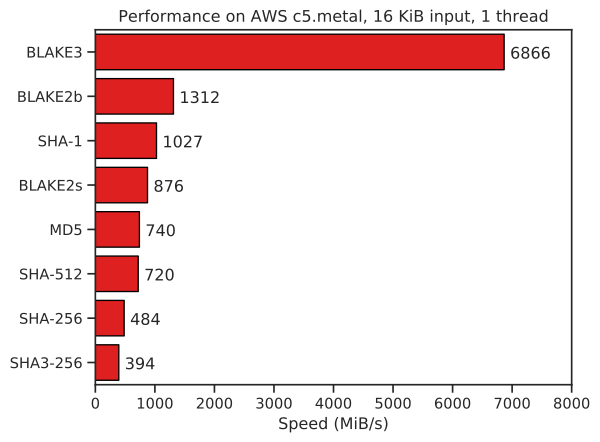
(Image courtesy of the BLAKE3 team)
Repository housekeeping
To better support our growing community, we’ve added issue and pull request templates to the repository. These templates serve as a helpful checklist for contributors, ensuring that all necessary information is provided upfront and making the review process smoother for everyone.
What’s next?
Ready to build? Head over to the Cot Website to explore the updated guide.
Cot is a community-driven project, and we thrive on your feedback. Whether it’s reporting bugs, suggesting features, or contributing code, your involvement is what makes this framework better for everyone. Don’t forget to join our Discord to share your feedback with us, too!
For a full list of changes, check out the official release notes. Thank you for being part of the journey!